Guides · AI and email campaigns
Can AI run your email campaigns?
Mostly, yes. An AI assistant such as Claude or Codex can plan a campaign, write it, prepare the list and set up the send in your email software, and you approve it before it's scheduled. On their own, AI assistants have no documented way to send each person on a list their own email: they stop at a draft or send single messages. To run a whole campaign, they need email software to work in, such as Groupmail 7 on your computer.
What each AI can do on its own
Checked 28 October 2026 against each company's own pages:
| Tool | What it does | A personal email to everyone on a list? |
|---|---|---|
| Copilot in Outlook | Helps you draft a message; you send it | Not documented |
| Claude with Gmail connected | Writes and sends, with your approval by default | No documented mail-merge or campaign workflow |
| Mailchimp's connector for Claude | Writes and saves drafts in Mailchimp | Mailchimp sends, after you finish there |
| Claude or Codex using Groupmail 7 | Writes, sets up the send; Groupmail 7 sends after you approve | Yes, each person gets their own email |
The gap is the last step. Writing is easy for any AI. Sending a personal email to hundreds of people needs software that handles groups, unsubscribes, sending limits and scheduling.
What an AI can do in a campaign
| Step | Can the AI do it? | What you do |
|---|---|---|
| Plan: who, what, when | Yes | Agree the plan |
| Write the subject and email | Yes | Edit and approve the words |
| Prepare the list from a spreadsheet or CRM export | Yes, as a CSV file | Check who's in it |
| Import the list and make a group | Yes, using the app's normal screens | — |
| Put the email into a design and send you a test | Yes | Read the test in your inbox |
| Schedule the send | It can set it up | Check the review screen and approve |
| Send | Your email software sends | Keep the app open at the time |
| Follow up on replies and results | It can draft replies and report | Decide what's next |
How the AI uses Groupmail 7
Groupmail 7 has no AI built in, and there's no Groupmail plug-in to install. You switch on your assistant's computer use, and it uses Groupmail 7's own screens as you would:
- Claude:
- Uses the Claude desktop app's computer use on Mac (macOS 14 or later) or Windows.
- Needs a Pro plan ($20 a month), Max or Ultra; it isn't available on Team or Enterprise plans. Anthropic calls it a preview.
- On a Mac you allow it in System Settings → Privacy & Security, under Accessibility and Screen Recording.
- Codex:
- Uses Computer Use, which you install and switch on in the Codex app, on Mac or Windows.
- Comes with ChatGPT plans such as Plus ($20 a month), with limited use. On Business and Enterprise, your admin controls it.
- Available in OpenAI's supported regions, which include the UK, Ireland and the rest of the EEA since June 2026.
- Both ask before they use each app.
Because the assistant uses the normal screens, Groupmail's own checks still apply: the send review, checking your unsubscribes and the exclusions for the chosen groups, and the sending limits.
The assistant sends screenshots of what it works on to its AI company for processing, including any names and addresses on screen. Groupmail stores your list on your computer, but anything your assistant sees is processed by its provider. Anthropic's own guidance advises against letting Claude use apps that show other people's personal information. If you follow it, use Claude to write the email only, and do the Groupmail steps yourself.
Where the human stays in charge
- Before scheduling: you read Groupmail's review screen. It shows the subject, who the email goes to, how many people, the sending account and the pace.
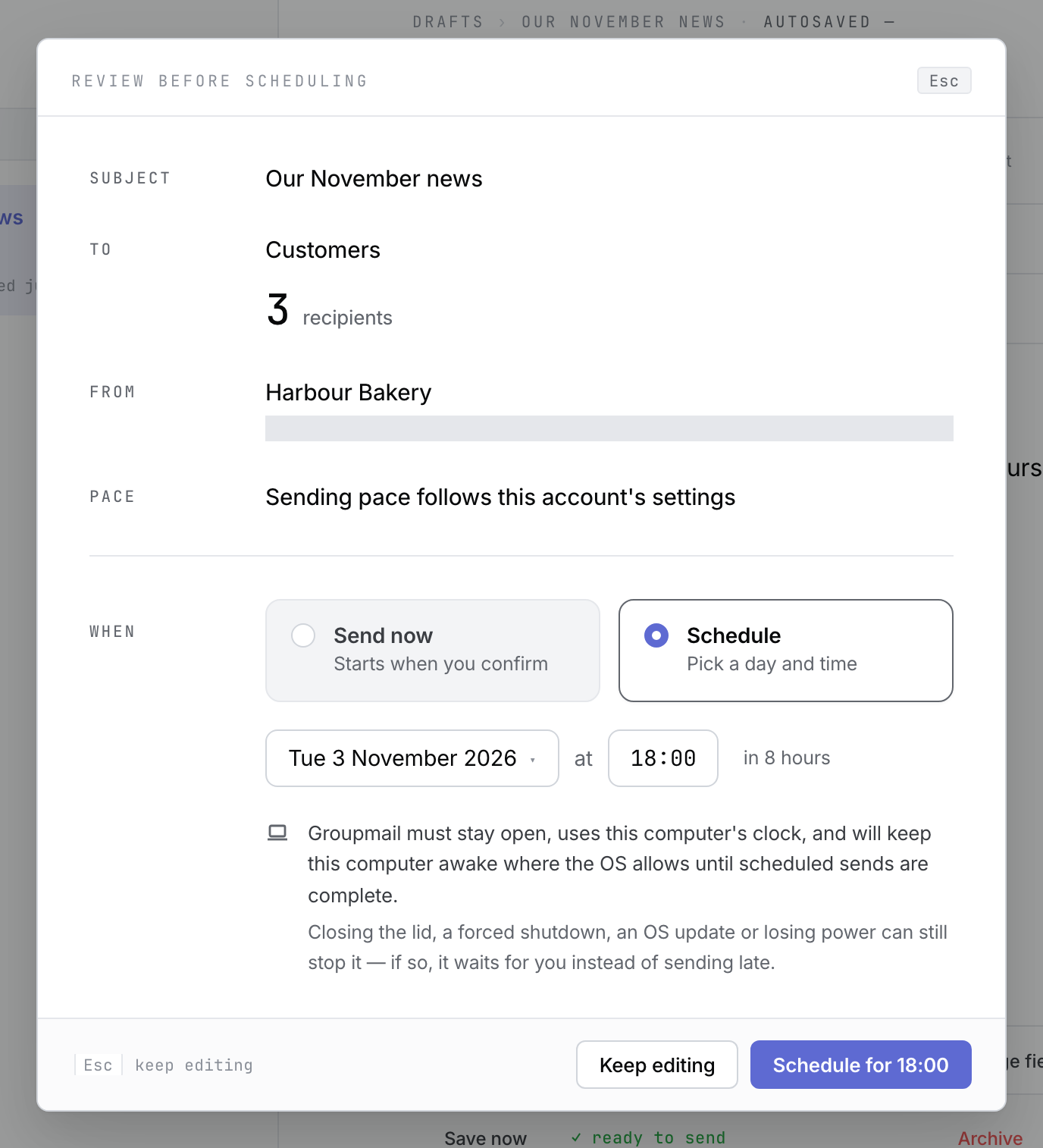 Illustration from a fictional draft in Groupmail 7; the sending address is masked. This is the screen you approve before anything is scheduled.
- Test first: the assistant sends a test to you, and you read it in your own inbox.
- At send time: Groupmail sends from your computer, so it has to be open and the computer awake. A send that's missed never goes out later on its own; you choose what to do. See How to schedule a message.
Which sending account to use
For newsletters and marketing email, use a sending service such as SMTP2GO, or your own mail server. Microsoft says bulk commercial email shouldn't go through an ordinary Microsoft 365 mailbox, and Gmail's sender rules expect bulk marketing senders to offer one-click unsubscribe. Your own Microsoft 365 or Gmail address is right for personal emails to people you work with, such as renewals, invitations and updates to a small group. See How to set up a sending account and Every Microsoft limit.
For the steps, with the prompts to use, see How do I write and send a newsletter with AI?.
What Groupmail 7 can't do
- It has no built-in AI. You use your own Claude or Codex, on its own plan.
- It can't send scheduled email while it's closed or the computer is asleep.
- It can't make an AI-written email land in the inbox. Your sending account, your list and the content decide that.
- It needs an Apple silicon Mac or a Windows computer.
Questions people ask
Can ChatGPT send emails for me?
ChatGPT can draft emails. To send a personal email to a whole list, it needs email software to work in. With Computer Use in the Codex app, OpenAI's assistant can prepare the send in Groupmail 7. You approve the review, then it schedules the send.
Can AI automate my email marketing?
Yes, for most of the work: planning, writing, building the list and setting up the send. Keep a person approving each campaign before it goes.
Can Claude send a newsletter?
Claude can write it and, with computer use, set it up in email software on your computer, such as Groupmail 7. You approve the review, then Claude schedules it and Groupmail 7 sends it.
Do I need an MCP connector or API?
No. Claude and Codex can use Groupmail 7's normal screens with computer use, the same way you do.
Will AI-written emails go to spam?
Who wrote an email doesn't guarantee where it lands, either way. Spam filters look at your sending account, your list, the content and how people react. Send from an authenticated account or a service such as SMTP2GO, to people who expect your email, with an unsubscribe link.
How much does it cost?
Groupmail 7 is $599 once, with a free 30-day trial, and the licence doesn't expire. The first year of updates and support is included; after that they renew at $175 a year until you cancel. Your AI assistant's plan and any sending service, such as SMTP2GO, are separate.
Try Groupmail 7 free for 30 days.
No card needed. Then $599 once, with a 30-day money-back guarantee.